
Pricing & Billing
Stoa pricing is $5/hr for live meetings and AI agent use. No seats, no tiers, no per-user fees. Everything else is free to use.
There are no seat licenses, no feature tiers, and no gates. Everyone on your team gets full access to everything. You only pay when you're actively in a meeting or using an agent.
What costs money
$5/hr, billed down to the second. The clock runs when you're in a meeting, when you have an agent running, or both. If you're in a call with three agents going at once, that's still $5/hr. One flat rate regardless of how many participants or agents are active.
Everything else is free. You can create Spaces, store files, browse projects, edit documents, leave comments, and use the full platform without being charged. The meter only runs during meetings and agent sessions.
Note
You get $50 in free credit when you first add a valid payment method. That covers a good amount of exploration before you spend anything.
Prepayment discount
Prepay for credits and you get a better rate. A team using 10 hours a week saves roughly $22/month compared to paying as you go.
Budget caps
You can set a budget cap so charges don't exceed a threshold you're comfortable with. Sessions are never interrupted mid-call.
How much does it actually cost?
A team meeting about 10 hours a week (roughly 43 hours a month):
| Monthly cost | |
|---|---|
| Pay-as-you-go | ~$217/mo |
| With prepayment | ~$195/mo |
That's for the whole team. No per-seat math.
Managing your balance
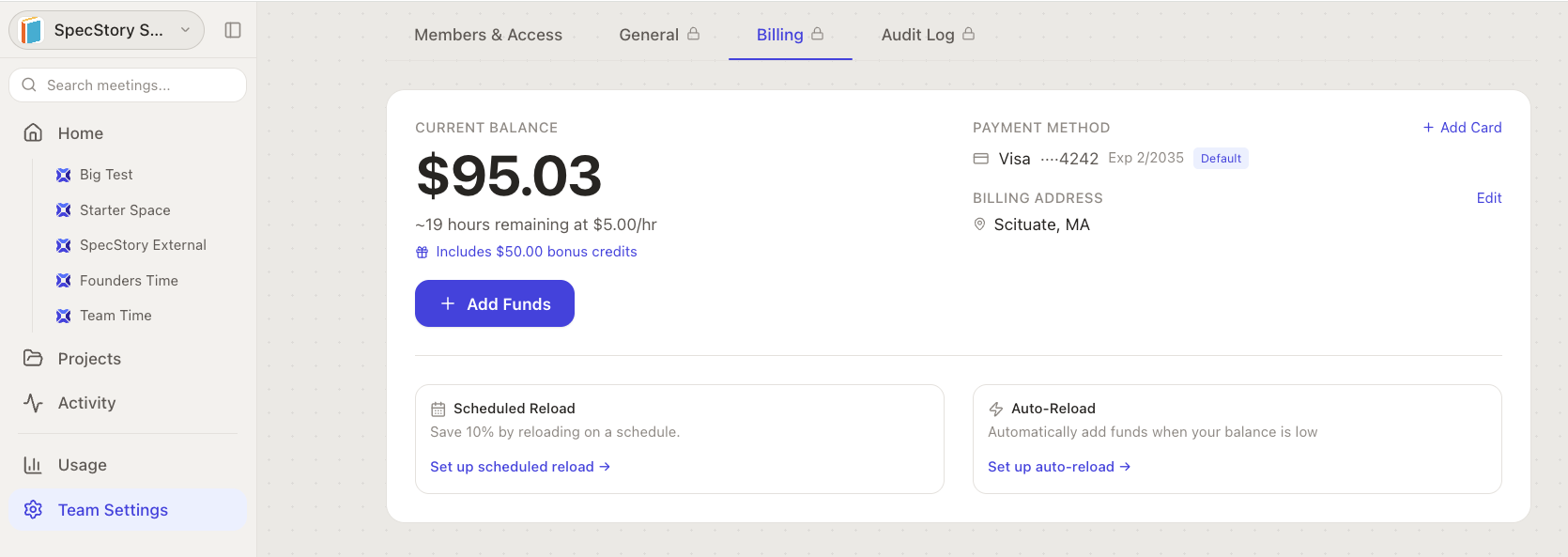
Your current balance is visible on the Billing page (Team Settings→Billing). You'll see:
- Current credit balance
- Lifetime credits loaded
- Lifetime usage
When your balance gets low, Stoa lets you know. Sessions are never interrupted mid-call.
Adding funds
Go to your team's Billing page and pick an amount. Funds are added instantly when you charge a saved card.
Payment methods
Add a credit card through Stripe's secure form on the Billing page. You can save multiple cards, set a default, and remove ones you no longer need. Only admins and owners can manage payment methods.
Usage breakdown
The Billing page shows:
- Total Meeting Time: total billable time for the period
- Total Charged: total billed amount
- Meetings in Period: number of sessions
A sessions table breaks down each meeting with call time, agent time, billable time, and cost.
Transaction history
Every charge and credit is logged:
- Credit Purchase and Bonus Credit entries show in green
- Usage charges show in red
- Each row shows the amount, running balance, description, and date